

با سلام ، من یک Panel در صفحه ام دارم که درون اون گروه هام رو نمایش میده ، حالا من آمدم یک کلید گذاشتم که از اینجا هم بشه گروه اضافه کرد . من با استفاده از Modal و اسکریپت Create عملیات ایجاد گروه رو انجام میدم فقط مشکل اینجاست که بعد از اینکه گروه اضافه می کنم ، لیست گروه هام در این panel آپدیت نمیشه مگه کل صفحه رفرش بشه تا بیاد در صورتی که من فقط می خوام همین panel فقط به صورت ایجکسی به روز بشه ، باید الان چه کار کنم؟ با سپاس از پاسختون
Controller
  // GET: Admin/Products/Create
        public ActionResult Create()
        {
            ViewBag.Groups = db.Subject_groups.ToList();
            return View();
        }

        // POST: Admin/Products/Create
        // To protect from overposting attacks, please enable the specific properties you want to bind to, for
        // more details see http://go.microsoft.com/fwlink/?LinkId=317598.
        [HttpPost]
        [ValidateAntiForgeryToken]
        public ActionResult Create([Bind(Include = "ProductID,Title,ShortDescription,Text,QuestionerID,ImageName,CreateDate")] Products products, List<int> selectedGroups, HttpPostedFileBase imageProduct, string tags)
        {

            if (ModelState.IsValid)
            {
                if (selectedGroups == null && imageProduct.IsImage())
                {
                    ViewBag.ErrorSelectedGroup = true;
                    ViewBag.Groups = db.Subject_groups.ToList();
                    return View(products);
                }
                products.ImageName = "No-image-available.jpg";
                if (imageProduct != null)
                {
                    products.ImageName = Guid.NewGuid().ToString() + Path.GetExtension(imageProduct.FileName);
                    imageProduct.SaveAs(Server.MapPath("/Images/ProductImages/" + products.ImageName));
                    ImageResizer img = new ImageResizer();
                    img.Resize(Server.MapPath("/Images/ProductImages/" + products.ImageName),
                        Server.MapPath("/Images/ProductImages/Thumb/" + products.ImageName));
                }
                products.CreateDate = DateTime.Now;
                products.UserID = db.Users.Single(u => u.Username == User.Identity.Name).UserID;
                db.Products.Add(products);

                //----Begin - Adding Log to database
                db.LogTable.Add(new LogTable()
                {
                    UserID = products.UserID,
                    Activities = "پست جدید",
                    Description = "ایجاد یک پرسش",
                    CreateDate = DateTime.Now
                });
                //----End - Adding Log to database

                //----Begin - Adding Groups to database
                foreach (int selectGroup in selectedGroups)
                {
                    db.Product_Selected_Groups.Add(new Product_Selected_Groups()
                    {
                        ProductID = products.ProductID,
                        GroupID = selectGroup
                    });
                }
                //----End - Adding Groups to database

                //----Begin - Adding Tag to database
                if (!string.IsNullOrEmpty(tags))
                {
                    string[] tag = tags.Split(',');
                    foreach (var t in tag)
                    {
                        db.Product_Tags.Add(new Product_Tags()
                        {
                            ProductID = products.ProductID,
                            Tag = t.Trim()
                        });
                    }
                }
                //----End - Adding Tag to database

                db.SaveChanges();
                return RedirectToAction("Index");
            }
            ViewBag.Groups = db.Subject_groups.ToList();
            return View(products);
        }
View Page
@using DataLayer
@model DataLayer.Products
@{
ViewBag.Title = "افزودن محصول جدید";
}
<h2 style="font-size: xx-large; font-family: 'B Yekan';font-weight: bold">افزودن محصول جدید</h2>
<div class="row">
@using (Html.BeginForm("Create", "Products", FormMethod.Post, new { enctype = "multipart/form-data" }))
{
<div class="col-md-8">
@Html.AntiForgeryToken()
@if (ViewBag.ErrorSelectedGroup == true)
{
<div class="alert alert-danger">
لطفاً گروه محصول را انتخاب کنید
</div>
}
<div class="form-horizontal">
@Html.ValidationSummary(true, "", new { @class = "text-danger" })
<div class="form-group">
@Html.LabelFor(model => model.Title, htmlAttributes: new { @class = "control-label col-md-2" })
<div class="col-md-10">
@Html.EditorFor(model => model.Title, new { htmlAttributes = new { @class = "form-control" } })
@Html.ValidationMessageFor(model => model.Title, "", new { @class = "text-danger" })
</div>
</div>
<div class="form-group">
@Html.LabelFor(model => model.ShortDescription, htmlAttributes: new { @class = "control-label col-md-2" })
<div class="col-md-10">
@Html.EditorFor(model => model.ShortDescription, new { htmlAttributes = new { @class = "form-control" } })
@Html.ValidationMessageFor(model => model.ShortDescription, "", new { @class = "text-danger" })
</div>
</div>
<div class="form-group">
@Html.LabelFor(model => model.Text, htmlAttributes: new { @class = "control-label col-md-2" })
<div class="col-md-10">
@Html.EditorFor(model => model.Text, new { htmlAttributes = new { @class = "form-control" } })
@Html.ValidationMessageFor(model => model.Text, "", new { @class = "text-danger" })
</div>
</div>
<div class="form-group">
<span class="control-label col-md-2">کلمات کلیدی</span>
<div class="col-md-10">
<input type="text" name="Tags" class="form-control" placeholder="کلمات کلیدی را با کاما(,) جدا کنید" />
</div>
</div>
<div class="form-group">
<div class="col-md-offset-2 col-md-10">
<input type="submit" value="ثبت محصول" class="btn btn-success" />
</div>
</div>
</div>
</div>
<div class="col-md-4">
<div class="panel panel-primary">
<div class="panel-heading">تصویر محصول</div>
<div class="panel-body">
<img id="imgPreviewProduct" style="margin: 8px auto; width: 300px; height: 300px;"
class="thumbnail" src="~/Images/ProductImages/No-image-available.jpg" />
<div class="form-group">
@Html.LabelFor(model => model.ImageName, htmlAttributes: new { @class = "control-label col-md-2" })
<div class="col-md-10">
<input type="file" id="ImageProduct" name="ImageProduct" />
@Html.ValidationMessageFor(model => model.ImageName, "", new { @class = "text-danger" })
</div>
</div>
</div>
</div>
<div class="panel panel-primary">
<div class="panel-heading">انتخاب گروه</div>
<div class="panel-body">
<a class="btn btn-info" onclick="Create()">new group</a>
<hr />
@*///-----*@
@{
Aseman_DBEntities db = new Aseman_DBEntities();//db.Subject_groups.ToList();
//
List<Subject_groups> groups = ViewBag.Groups;
<ul class="category-menu">
@foreach (var group in groups.Where(g => g.ParentID == null))
{
<li>
<input type="checkbox" name="SelectedGroups" value="@group.GroupID" /> <span>@group.GroupTitle</span>
@if (groups.Any(g => g.ParentID == group.GroupID))
{
<ul>
@foreach (var subGroup in groups.Where(g => g.ParentID == group.GroupID))
{
<li>
<input type="checkbox" name="SelectedGroups" value="@subGroup.GroupID" />
<span>@subGroup.GroupTitle</span>
</li>
}
</ul>
}
</li>
}
</ul>
}
</div>
</div>
</div>
}
</div>
<div>
@Html.ActionLink("بازگشت به لیست محصولات", "Index")
</div>
<!-- Modal -->
<div class="modal fade" id="myModal" tabindex="-1" role="dialog" aria-labelledby="myModalLabel">
<div class="modal-dialog" role="document">
<div class="modal-content">
<div class="modal-header">
<button type="button" class="close" data-dismiss="modal" aria-label="Close"><span aria-hidden="true">×</span></button>
<h4 class="modal-title" id="myModalLabel" style="font-size: medium; font-family: 'B Yekan';font-weight: bold">Modal title</h4>
</div>
<div class="modal-body" id="MyModalBody">
...
</div>
</div>
</div>
</div>
@section Scripts
{
<script>
function readURL(input) {
if (input.files && input.files[0]) {
var reader = new FileReader();
reader.onload = function (e) {
$('#imgPreviewProduct').attr('src', e.target.result);
}
reader.readAsDataURL(input.files[0]);
}
}
$("#ImageProduct").change(function () {
readURL(this);
});
</script>
<script src="/ckeditor/ckeditor.js"></script>
<script src="/ckeditor/adapters/jquery.js"></script>
<script>
$(function () {
$('#Text').ckeditor();
});
</script>
<script>
function Create(parentId) {
$.get("/Admin/Subject_groups/Create/" + parentId,
function (result) {
$("#myModal").modal();
$("#myModalLabel").html('افـزودن گروه جدید');
$("#MyModalBody").html(result);
});
}
function success() {
$("#myModal").modal('hide');
}
</script>
}
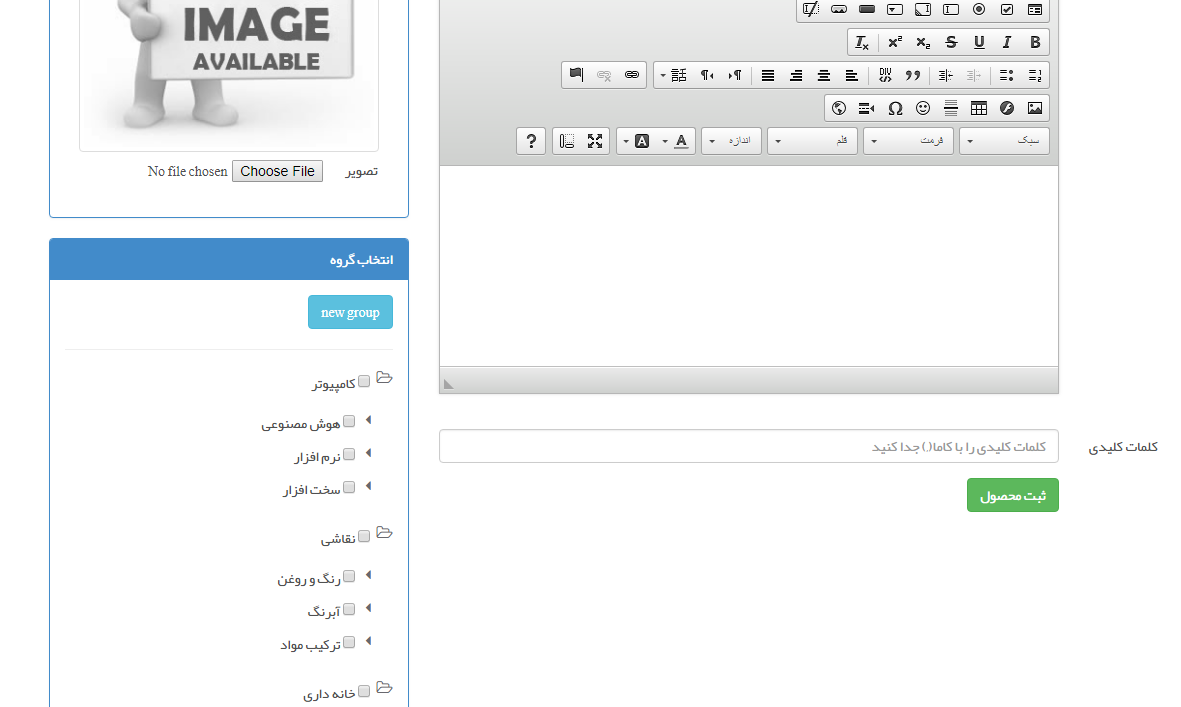
صفحه ام در حالت اجرا
کد صفحه Create ای که در Modal اجرا میشه.
@model DataLayer.Subject_groups

@{
    ViewBag.Title = "افزودن گروه";
}


@using (Ajax.BeginForm("Create","Subject_groups",FormMethod.Post, new AjaxOptions()
{
    OnSuccess = "success",
    UpdateTargetId = "listGroup"
}))
{
    @Html.AntiForgeryToken()
    @Html.HiddenFor(m=>m.ParentID)
    <div class="form-horizontal">
        @Html.ValidationSummary(true, "", new { @class = "text-danger" })
        <div class="form-group">
            @Html.LabelFor(model => model.GroupTitle, htmlAttributes: new { @class = "control-label col-md-2" })
            <div class="col-md-10">
                @Html.EditorFor(model => model.GroupTitle, new { htmlAttributes = new { @class = "form-control" } })
                @Html.ValidationMessageFor(model => model.GroupTitle, "", new { @class = "text-danger" })
            </div>
        </div>

        <div class="form-group">
            <div class="col-md-offset-2 col-md-10">
                <input type="submit" value="ثبت گروه" class="btn btn-success" />
            </div>
        </div>
    </div>
}
سلام
در همین دوره بخش گروه ها به این شیوه پیاده سازی شده
از کد های اون ایده بگیرید و بعنوان نمونه استفاده کنید

 مخصوص اعضای ویژه