

سلام استاد،علت این که میان تگ هاwhitespace میفته چیه مثل تصویر زیر: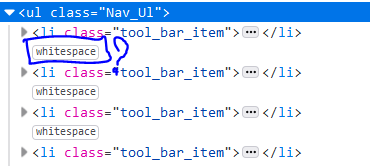
و تاثیرش رو که در منوی بالای سایت میزاره اینجوریه که با حرکت موس بر روی منو آیکون موس از حالت فلش به i بزرگ تبدیل میشه انگاری یک باکس هست که مثلا می خواهی توی اون بنویسی؟چجوری میشه حلش کرد.ممنون از پاسخ گویی
با سلام خدمت شما همراه عزیز
لطفا نمونه کد رو ارسال کنید بررسی میکنم حتما
سلام فایل فشرده حاوی سورس کد رو برای شما در پیوست این پیام ارسال می کنم.بعد دانلود فایل index.html رو اجرا کنید و با موس روی nav حرکت آهسته کنید متوجه می شید.علتش رو نمی دونم.
کد های index.html:
<html lang="en">

<head>
    <meta charset="UTF-8">
    <meta name="viewport" content="width=device-width, initial-scale=1.0">
    <meta http-equiv="X-UA-Compatible" content="ie=edge">
    <link rel="stylesheet" href="css/styles.css">
    <title>Document</title>
</head>

<body>
    <div class="header">
        <a href="#" class="aInHeader">Transit</a>
        <nav>
            <ul class="Nav_Ul">
                <li class="tool_bar_item"><a href="#" class="aInNav Tool_Hover">Home</a></li>
                <li class="tool_bar_item"><a href="#" class="aInNav Tool_Hover">Generic</a></li>
                <li class="tool_bar_item"><a href="#" class="aInNav Tool_Hover">Elements</a></li>
                <li class="tool_bar_item"><span><a href="#" class="btnNav">Sign Up</a></span></li>
            </ul>
        </nav>
        <h2 class="CenterHeaderInHeader">Hi. This is Transit.</h2>
        <p class="CenterPInHeader">Lorem ipsum dolor sit amet, consectetur adipisicing elit.</p>
        <div class="buttons">
            <a href="#" class="btn blue">Lorem ipsum dolor</a>
        </div>
    </div>
</body>

</html>
محتوای فایل css:
@import url(font-awesome-min.css);
@import url(http://fonts.googleapis.com/css?family=/Raleway:700,400);
body {
    margin: auto;
    font-family: "Raleway", Helvetica, sans-serif;
}

.header {
    background-image: url(../images/dark_tint.png), url(../images/bokeh_car_lights_bg.jpg);
    background-size: 1023px;
}

.aInHeader {
    text-decoration: none;
    display: inline-block;
    position: relative;
    font-size: 20px;
    top: 37px;
    left: 48px;
    font-weight: bold;
    color: white;
}

.aInNav {
    text-decoration: none;
    color: gray;
    transition: color 0.3s ease-in-out;
}

.Tool_Hover:hover {
    color: white;
}

.aInHeader:hover {
    text-decoration: underline;
}

li {
    display: inline-block;
    font-size: 16px;
}

.Nav_Ul {
    position: absolute;
    right: 16px;
    top: 16px;
}

li.Tool_bar_item {
    margin-right: 30px;
}

.btnNav {
    border-radius: 20px;
    text-decoration: none;
    background-color: white;
    color: black;
    height: 21px;
    display: inline-block;
    padding: 8px 18px;
}

.CenterHeaderInHeader,
.CenterPInHeader {
    text-align: center;
    color: white;
}

.CenterHeaderInHeader {
    margin-top: 185px;
    font-weight: bold;
    font-size: 59px;
}

.CenterPInHeader {
    font-size: 22.5px;
    margin-top: -20px;
}

.buttons {
    text-align: center;
    margin-top: 45px;
}

.btn {
    border-radius: 25px;
    box-shadow: 0px 3px 1px rgb(15, 164, 250);
}

a.btn {
    /* margin-bottom: 121px;
    display: inline-block; */
    padding: 16px 49px;
}

.blue {
    color: white;
    background-color: #3cadd4;
    text-decoration: none;
    font-size: 18px;
    padding: 12px;
}

.blue:hover {
    background-color: #5dcdf3;
}
فایل css رو در پوشه ایی به نام css و در کنار فایل index.html قرار بدهید.
https://stackoverflow.com/questions/38184036/small-white-space-between-li-items/38184118
سرچ ساده !!!



 مخصوص اعضای ویژه