

سلام
خسته نباشید استاد
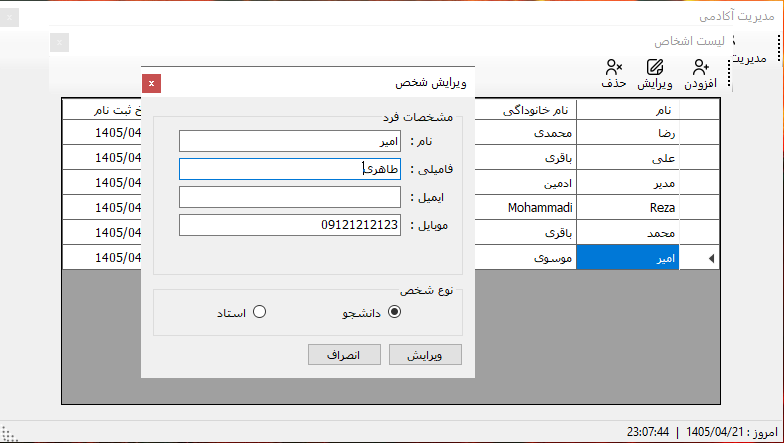
من تمرین انجام دادم و ویرایش درست کار میکنه ولی وقتی متد BindGridفراخونی میشه اطلاعات بروز نمیشن حتما باید فرم frmListPerson یک بار ببندم و دوباره باز کنم و بعد درست میشه
public partial class frmEdit : Form
{
    Toplearn_DB_Context _Context = new Toplearn_DB_Context();
    int _personId;
    Person editPerson;
    public frmEdit(int personId)
    {
        _personId = personId;
        InitializeComponent();
    }

    private void frmEdit_Load(object sender, EventArgs e)
    {
        editPerson = _Context.People.Single(s => s.PersonId == _personId);
        txtName.Text = editPerson.Name;
        txtFamily.Text = editPerson.Family;
        txtEmail.Text = editPerson.Email;
        txtMobile.Text = editPerson.Mobile;
        if (editPerson.IsTeacher)
        {
            rbTeacher.Checked = true;
        }
        else
        {
            rbTeacher.Checked = false;
        }
    }

    private void btnCancel_Click(object sender, EventArgs e)
    {
        DialogResult = DialogResult.Cancel;
    }

    private void btnSave_Click(object sender, EventArgs e)
    {
        if (ValidateInputs())
        {
            editPerson.Name = txtName.Text;
            editPerson.Family = txtFamily.Text;
            editPerson.Email = txtEmail.Text;
            editPerson.Mobile = txtMobile.Text;
            editPerson.IsTeacher = false;
            if (rbTeacher.Checked == true)
            {
                editPerson.IsTeacher = true;
            }
            _Context.SaveChanges();
            DialogResult = DialogResult.OK;
        }
    }
    bool ValidateInputs()
    {
        bool isValidate = true;
        if (string.IsNullOrEmpty(txtName.Text))
        {
            lblValidateName.Visible = true;
            txtName.BackColor = Color.Tomato;
            isValidate = false;
        }
        else
        {
            lblValidateName.Visible = false;
            txtName.BackColor = Color.White;

        }
        if (string.IsNullOrEmpty(txtFamily.Text))
        {
            lblValidateFamily.Visible = true;
            txtFamily.BackColor = Color.Tomato;
            isValidate = false;
        }
        else
        {
            lblValidateFamily.Visible = false;
            txtFamily.BackColor = Color.White;

        }
        if (string.IsNullOrEmpty(txtMobile.Text))
        {
            lblValidateMobile.Visible = true;
            txtMobile.BackColor = Color.Tomato;
            isValidate = false;
        }
        else
        {
            lblValidateMobile.Visible = false;
            txtMobile.BackColor = Color.White;
        }
        if (isValidate)
        {
            lblValid.Visible = false;
        }
        else
        {
            lblValid.Visible = true;
        }
        return isValidate;
    }
}
و از متد Update هم استفاده کردم که داخل جلسه 91 گفتید ولی بازم نشد اگه میشه راهنمایی بکنید
private void btnSave_Click(object sender, EventArgs e)
{
    if (ValidateInputs())
    {
        editPerson.Name = txtName.Text;
        editPerson.Family = txtFamily.Text;
        editPerson.Email = txtEmail.Text;
        editPerson.Mobile = txtMobile.Text;
        editPerson.IsTeacher = false;
        if (rbTeacher.Checked == true)
        {
            editPerson.IsTeacher = true;
        }
        _Context.People.Update(editPerson); // اینجا <-----
        _Context.SaveChanges();
        DialogResult = DialogResult.OK;
    }
}
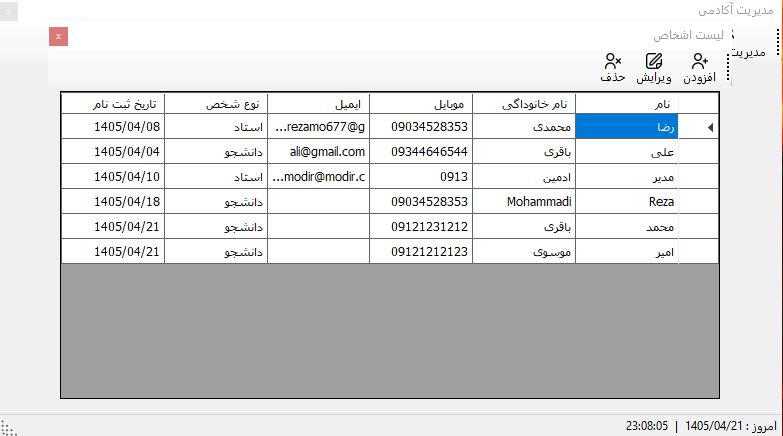
سلام ، وقت بخیر
بسیار عالی
در جلسه ی امروز توضیح دادن علت مشکل چیست



 مخصوص اعضای ویژه