

سلام براستاد عزیز و بزرگوار:
من با ایده گرفتن از یک نرم افزار و همچنین کمک از هوش مصنوعی این تمرین را به صورت زیر حل کردم. امیدوارم مفید باشد.
توضیح کلی به این صورت است که برای هرعکس یک چک باکس زیرآن قرار گرفته است و کاربر با انتخاب چک باکس، پس از ویرایش ، عکس ها را حذف می کند. وقتی همزمان کاربر عکس جدید هم انتخاب نماید، عکس های جدید بلافاصله بر روی صفحه با حاشیه زردرنگ و برچسب "تصویر جدید" نمایش داده می شوند. همچنین یک ضربدر روی گوشه سمت چپ هرعکس قرار می گیرد تا اگر کاربر تصمیمش عوض شد، با فشردن ضربدر ، عکس جدید (که هنوز در دیتابیس ذخیره نشده است) ، از روی صفحه پاک می شود. در عکس زیر این موارد نشان داده شده است.
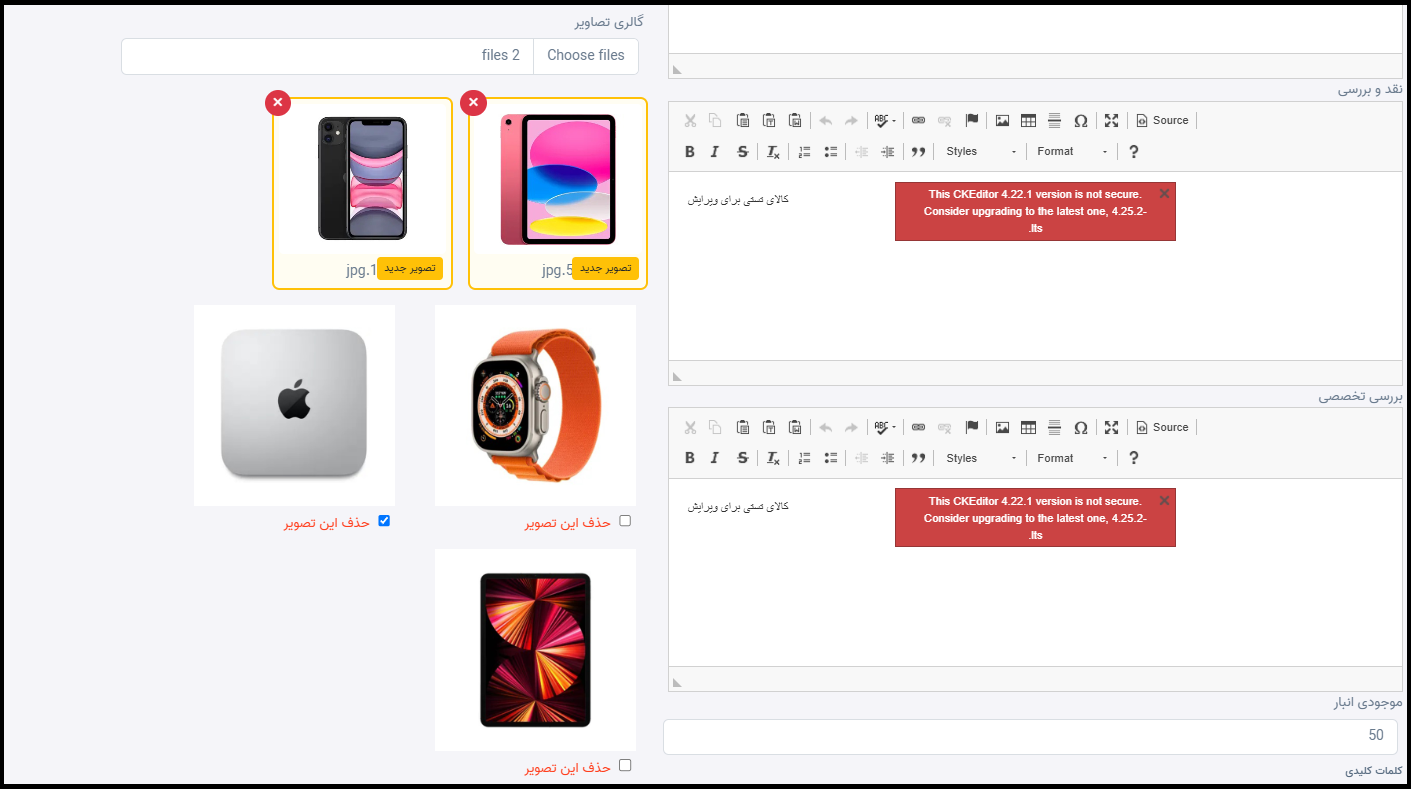
اما پیاده سازی این روش:
1- یک فیلد DeleteGalleryIds (لیست شناسههای گالری برای حذف) به AdminEditProductViewModelاضافه میکنیم.
public List<int>? DeleteGalleryIds { get; set; } // شناسه تصاویری که باید حذف شوند2- متدهای زیر را به ProductRepository برای بازخوانی و حذف دستهای گالری اضافه میکنیم (البته مسلما به IProductRepository هم اضافه می شوند)
public async Task<List<ProductGallery>> GetGalleriesByIdsAsync(List<int> ids)
{
    return await _context.ProductGalleries
        .Where(g => ids.Contains(g.Id))
        .ToListAsync();
}

public void RemoveRange(IEnumerable<ProductGallery> galleries)
{
    _context.ProductGalleries.RemoveRange(galleries);
}
3- در ProductService به متد EditProductAsync قطعه کد زیر را اضافه می کنیم (قبل از بخش حذف تگ ها).
// ── حذف تصاویر انتخابشده ──
if (model.DeleteGalleryIds != null &amp;amp;&amp;amp; model.DeleteGalleryIds.Any())
{
var galleriesToDelete = await _productRepository.GetGalleriesByIdsAsync(model.DeleteGalleryIds);
foreach (var gallery in galleriesToDelete)
{
ProductGallery? g = gallery as ProductGallery;
DeleteProductImage(g!.ImageName); // حذف فایل فیزیکی
}
_productRepository.RemoveRange(galleriesToDelete);
}
// شروع حذف تگ ها
await _productRepository.DeleteProductTags(product.Id);4- اصلاح کد ویوی Edit (افزودن چکباکس حذف برای هر تصویر و انتخاب گالری و نمایش تصاویر)
این قسمت در ویو باید جایگزین کد قبلی شود.
<hr />
<div class="form-group">
<label asp-for="Gallaries" class="control-label"></label>
<input asp-for="Gallaries"
id="galleryInput"
class="form-control"
type="file"
accept="image/*"
multiple />
<span asp-validation-for="Gallaries" class="text-danger"></span>
</div>
<div id="newGalleryPreview" class="row mt-3"></div>
<div>
@if (Model.ProductGalleries != null &amp;amp;&amp;amp; Model.ProductGalleries.Any())
{
<div class="row">
@foreach (var item in Model.ProductGalleries)
{
<div class="col-5 m-2 img-thumbnail">
<img src="/ProductImages/@item.ImageName" style="max-width:100%;" />
<label class="d-block mt-1 text-danger">
<input type="checkbox" name="DeleteGalleryIds" value="@item.Id" />
حذف این تصویر
</label>
</div>
}
</div>
}
else
{
<p class="text-muted">هنوز تصویری در گالری وجود ندارد.</p>
}
</div>
// شروع کدهایی که بدون تغییر می مانند //
</div>
</form>
</div>
<div>
<a asp-action="Index">بازگشت به لیست</a>
</div>
5- این استایل ها باید داخل بخش <style> صفحه قرار گیرد:
<style>
    .new-gallery-item {
        position: relative;
        border: 3px solid #ffc107; /* زرد؛ یعنی هنوز در دیتابیس ذخیره نشده */
        border-radius: 8px;
        padding: 5px;
        margin: 8px;
        background-color: #fffdf2;
    }

    .new-gallery-item img {
        width: 100%;
        height: 160px;
        object-fit: cover;
        border-radius: 5px;
    }

    .new-gallery-badge {
        position: absolute;
        right: 8px;
        bottom: 8px;
        background-color: #ffc107;
        color: #212529;
        padding: 3px 8px;
        border-radius: 4px;
        font-size: 12px;
    }

    .remove-new-gallery {
        position: absolute;
        top: -10px;
        left: -10px;
        width: 28px;
        height: 28px;
        border: none;
        border-radius: 50%;
        background-color: #dc3545;
        color: white;
        font-size: 20px;
        line-height: 22px;
        cursor: pointer;
        z-index: 2;
    }

    .remove-new-gallery:hover {
        background-color: #a71d2a;
    }
</style>
6- این کد هم باید در بخش @section Scripts قرار دهید (جاوا اسکریپت)
<script>
const galleryInput = document.getElementById('galleryInput');
const newGalleryPreview = document.getElementById('newGalleryPreview');
// فایلهایی که کاربر انتخاب کرده است
let selectedGalleryFiles = [];
galleryInput.addEventListener('change', function (event) {
const files = Array.from(event.target.files);
files.forEach(file => {
// فقط فایلهای تصویری مجاز هستند
if (!file.type.startsWith('image/')) {
return;
}
// جلوگیری از اضافه شدن دوباره یک فایل مشابه
const isDuplicate = selectedGalleryFiles.some(existingFile =>
existingFile.name === file.name &amp;amp;&amp;amp;
existingFile.size === file.size &amp;amp;&amp;amp;
existingFile.lastModified === file.lastModified
);
if (!isDuplicate) {
selectedGalleryFiles.push(file);
}
});
updateGalleryInput();
renderNewGalleryImages();
});
function renderNewGalleryImages() {
newGalleryPreview.innerHTML = '';
selectedGalleryFiles.forEach((file, index) => {
const reader = new FileReader();
reader.onload = function (event) {
const wrapper = document.createElement('div');
wrapper.className = 'col-md-4 col-sm-6 new-gallery-item';
wrapper.innerHTML = `
<button type="button"
class="remove-new-gallery"
title="حذف تصویر"
onclick="removeNewGalleryImage(${index})">
&amp;amp;times;
</button>
<img src="${event.target.result}"
alt="${file.name}" />
<span class="new-gallery-badge">
تصویر جدید
</span>
<div class="text-center mt-2 text-truncate"
title="${file.name}">
${file.name}
</div>
`;
newGalleryPreview.appendChild(wrapper);
};
reader.readAsDataURL(file);
});
}
function removeNewGalleryImage(index) {
// حذف فایل از آرایه
selectedGalleryFiles.splice(index, 1);
// بهروزرسانی فایلهای واقعی input
updateGalleryInput();
// بهروزرسانی پیشنمایش
renderNewGalleryImages();
}
function updateGalleryInput() {
const dataTransfer = new DataTransfer();
selectedGalleryFiles.forEach(file => {
dataTransfer.items.add(file);
});
galleryInput.files = dataTransfer.files;
}
</script>



 مخصوص اعضای ویژه