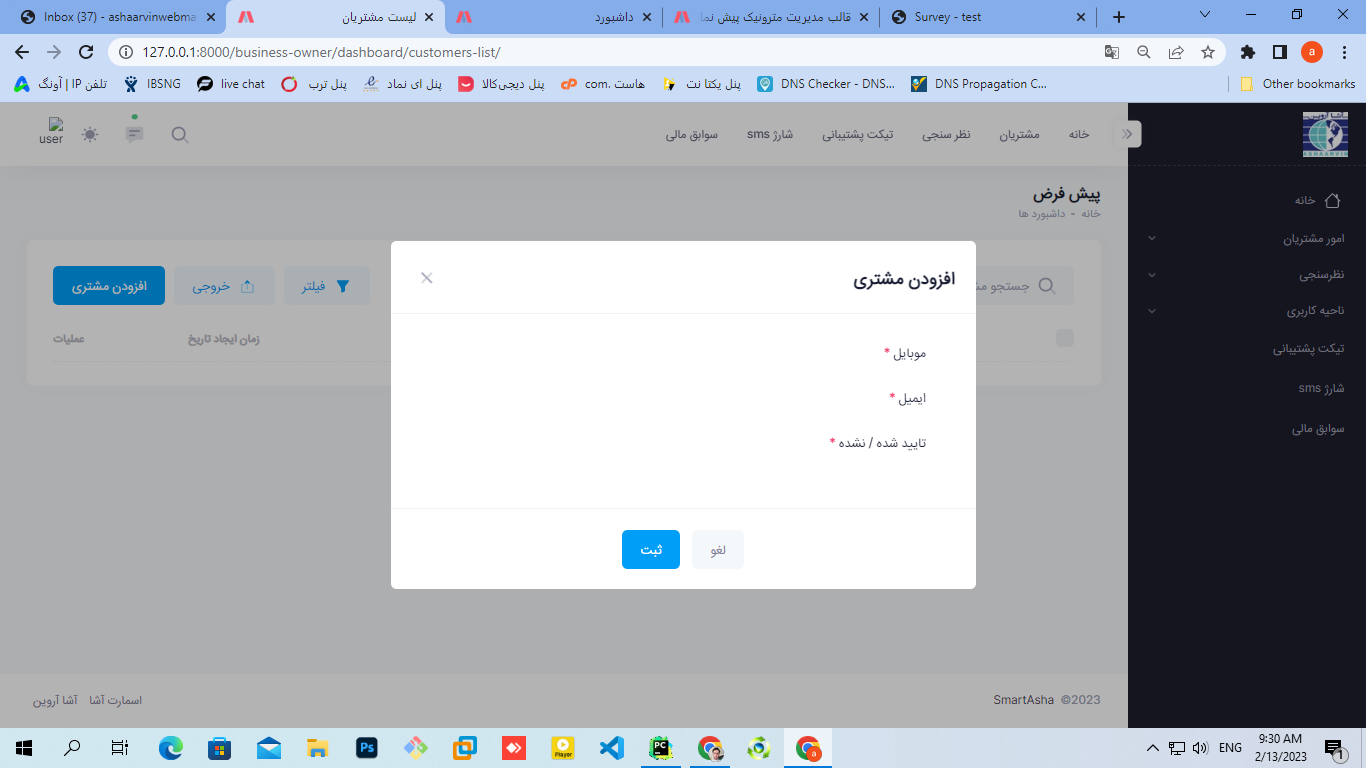

سلام وقت بخیر
من هر کاری میکنم این فیلد های اینپوت فرم رو نمایش نمیده:
class CustomerForm(forms.ModelForm):
    class Meta:
        model = BusinessCustomer
        fields = ['mobile', 'email', 'is_active']
        widgets = {
            "mobile": forms.TextInput(attrs={"class": "form-control form-control-solid", }),
            "email": forms.TextInput(attrs={"class": "form-control form-control-solid", }),
            "is_active": forms.RadioSelect(attrs={"class": "form-control form-control-solid", }),

        }
        labels = {
            'mobile': 'mobile',
            'email': 'email',
            'is_active': 'is_active',

        }
ویو:
# View created for Add Customer page
@method_decorator(login_required, name='dispatch')
def AddCustomerPageView(request):
    form = CustomerForm()
    if request.method == 'POST':
        form = CustomerForm(request.POST)
        if form.is_valid():
            form.save()
            messages.success(request, "مشتری با موفقیت اضافه شد! خدا بده برکت")
            return redirect('customers_list')

    context = {
        "form": form,
    }
    return render(request, 'business_owner_panel/customers_list.html', context)


# View created for Update Customer page
@method_decorator(login_required, name='dispatch')
def UpdateCustomerPageView(request, customer_id):
    customer = BusinessCustomer.objects.get(id=customer_id)
    form = CustomerForm(instance=customer)
    if request.method == 'POST':
        form = CustomerForm(request.POST, instance=customer)
        if form.is_valid():
            form.save()
            messages.success(request, "اطلاعات مشتری با موفقیت به روزرسانی شد! خدا خیر بده")
            return redirect('customers_list')

    context = {
        "form": form,
    }
    return render(request, 'business_owner_panel/customers_list.html', context)
html:
<form method="post" class="form fv-plugins-bootstrap5 fv-plugins-framework" action="{% url 'customers_list' %}" id="kt_modal_add_customer_form" data-kt-redirect="{% url 'customers_list' %}">
                    {% csrf_token %}


     <!--begin::Input group-->
      <div class="fv-row mb-7 fv-plugins-icon-container">


            		{{ form.mobile }}
          </div>


         <div class="fv-row mb-7 fv-plugins-icon-container">


                   {{ form.email }}

          </div>


         <div class="fv-row mb-7 fv-plugins-icon-container">


			{{ form.is_active }}


</div>

 </div>


   <!--begin::Modal footer-->
     <div class="modal-footer flex-center">


            <!--begin::Button-->
            <button type="reset" id="kt_modal_add_customer_cancel" class="btn btn-light me-3">لغو</button>
              <!--end::Button-->


               <!--begin::Button-->
                <button type="submit" id="kt_modal_add_customer_submit" class="btn btn-primary">
                     <span class="indicator-label">ثبت</span>
                     <span class="indicator-progress">لطفا صبر کنید...
                     <span class="spinner-border spinner-border-sm align-middle ms-2"></span>
</span>
                    </button>
                        <!--end::Button-->

                    </div>
                    <!--end::Modal footer-->
                </form>
سلام در فایل view از فرمتون print میگیرین ببینید چی میده
print(form)
این کارو کردم چیزی نمایش نداد
ببینید این ساختار url ها هست:
 path('add_customer', views.AddCustomerPageView, name="add_customer"),
    path('update_customer/<str:customer_id>', views.UpdateCustomerPageView, name="update_customer"),
    path('delete_customer/<str:customer_id>', views.DeleteCustomerPageView, name="delete_customer"),
البته فکر نمیکنم ربطی به اینا داشته باشه
ببینید من وقتی میخوام لیست مشتریان رو نمایش بدم هم نمایش نمیده درحالی که تو دیتابیس دوتا مشتری هست
وقتی context رو میفرستم به صفحه html و داخل html وقتی باهاش کار میکنم قشنگ اینتلیسنس هم دارم و فیلدهای مختلفش رو نوشتم که نمایش بده اما نمایش نمیده
@method_decorator(login_required, name='dispatch')
def CustomersPageView(request):
    customers = BusinessCustomer.objects.all()
    context = {
        "customers": customers,
    }
    return render(request, 'business_owner_panel/customers_list.html', context)
                        {% for customer in customers %}


                            <tr class="even">

                                <!--begin::Checkbox-->
                                <td>
                                    <div class="form-check form-check-sm form-check-custom form-check-solid">
                                        <input class="form-check-input" type="checkbox" value="1">
                                    </div>
                                </td>
                                <!--end::Checkbox-->

                                <!--begin::موبایل=-->
                                <td>
                                    <a href="../../demo1/dist/apps/customers/view.html" class="text-gray-800 text-hover-primary mb-1">{{ customer.mobile }}</a>
                                </td>
                                <!--end::موبایل=-->

                                <!--begin::ایمیل=-->
                                <td>
                                <a href="#" class="text-gray-600 text-hover-primary mb-1">{{ customer.email }}</a>
                                </td>
                                <!--end::ایمیل=-->

                                <!--begin::تایید شده یا نشده=-->
                                <td>
                                <div class="badge badge-light-success fw-bold">{{ customer.is_active }}</div>
                                </td>
                                <!--end::تایید شده یا نشده=-->

                                <!--begin::تاریخ=-->
                                <td data-order="Invalid date">{{ customer.date_joined }}</td>
                                <!--end::تاریخ=-->


                            </tr>


                                {% endfor %}
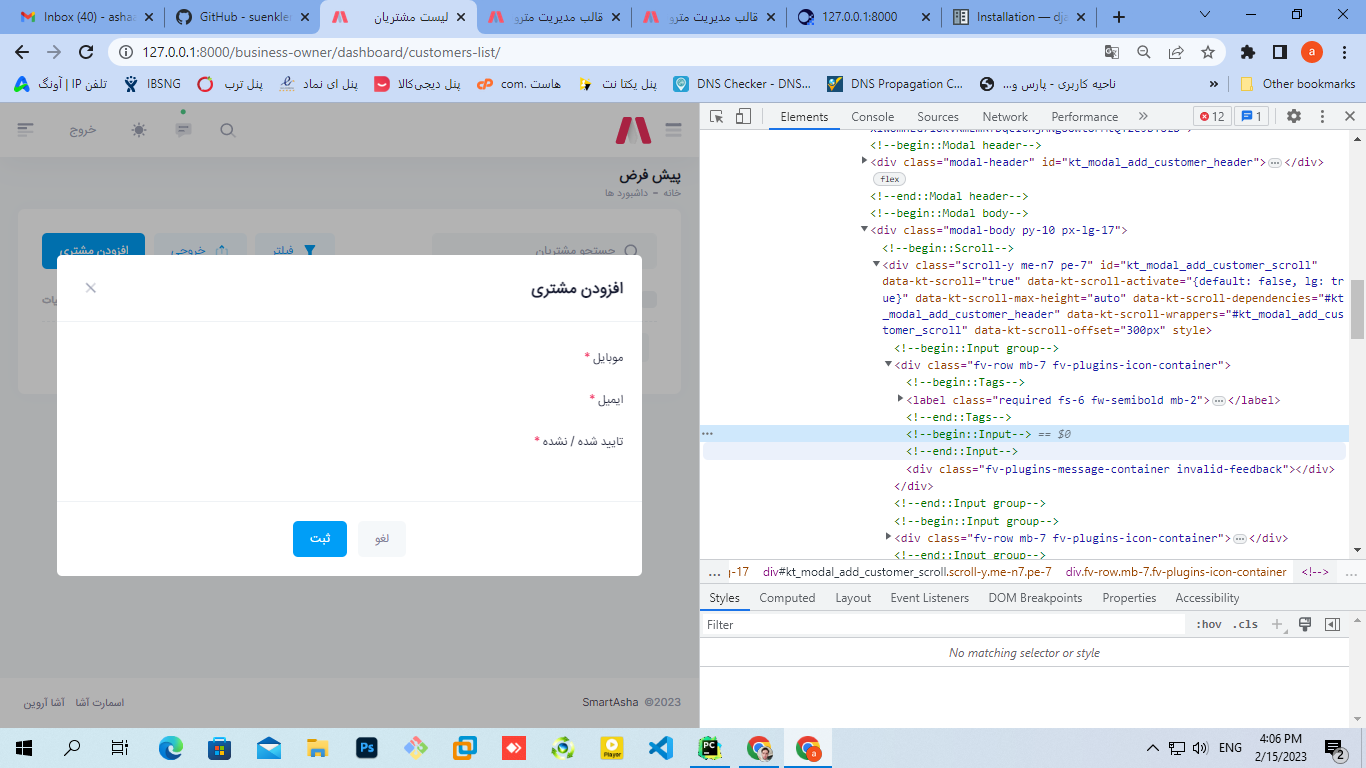
لطفا در صفحه ی فرم ، inspect element رو فعال کنین و بررسی کنین که المان های فرم در صفحه لود شدن یا خیر
از اونجایی که label ها نمایش داده میشن احتمالا در صفحه هستن اما نمایش داده نمیشن
سلام مجدد
این کارو کردم اما اصلا کد html واسه اینپوت تولید نشده
label هارو از فرم نگرفتم و خودم تگ label رو تو html نوشتم



 مخصوص اعضای ویژه