

namespace Calculator_v1
{
    public partial class Form1 : Form
    {
        public Form1()
        {
            InitializeComponent();
        }
        string Input = "";
        double FirstNum;
        double SecondNum;
        double result;
        string currentOperation = "";
        Operation OP = new();

        private void button1_Click(object sender, EventArgs e)
        {

        }

        private void btn1_Click(object sender, EventArgs e)
        {

        }
        private void NumberButton_Click(object sender, EventArgs e)
        {
            Button btn = (Button)sender;
            Input += btn.Text;
            txtPanel.Text = Input;
        }

        private void btnClear_Click(object sender, EventArgs e)
        {
            Input = "";
            FirstNum = 0;
            SecondNum = 0;
            result = 0;
            currentOperation = "";
            txtPanel.Text = "";
        }
        private void OperatorButton_Click(object sender, EventArgs e)
        {
            Button OPbtn = (Button)sender;
            if (Input != "")
            {
                FirstNum = Convert.ToDouble(Input);
            }
            else
            {
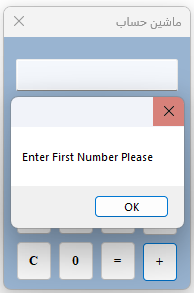
                MessageBox.Show("Enter First Number Please");
                return;
            }
            Input = "";
            currentOperation = OPbtn.Text;
        }

        private void btnEqual_Click(object sender, EventArgs e)
        {
            if (Input != "")
            {
                SecondNum = Convert.ToDouble(Input);
            }
            else
            {
                MessageBox.Show("Enter Second Number Please");
                return;
            }
            Input = "";

            switch (currentOperation)
            {
                case "+":
                    result = OP.Sum(FirstNum, SecondNum);
                    break;

                case "-":
                    result = OP.Subtract(FirstNum, SecondNum);
                    break;

                case "*":
                    result = OP.Multiply(FirstNum, SecondNum);
                    break;

                case "/":
                    if (SecondNum == 0)
                    {
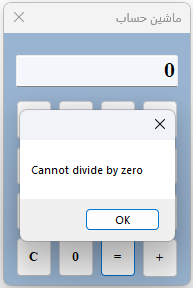
                        MessageBox.Show("Cannot divide by zero");
                        return;
                    }
                    else
                    {
                        result = OP.Divide(FirstNum, SecondNum);
                    }
                    break;

            }
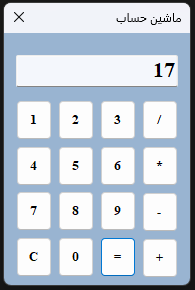
            txtPanel.Text = Convert.ToString(result) ;
        }

    }
}
using System;
using System.Collections.Generic;
using System.Text;
namespace Calculator_v1
{
internal class Operation
{
public double Sum (double x, double y)
{
return x + y;
}
public double Subtract (double x, double y)
{
return x - y;
}
public double Multiply(double x, double y)
{
return x * y;
}
public double Divide(double x, double y)
{
return x / y;
}
}
}
استاد جان من اینجا از ایونت مشترک استفاده کردم برای دکمه ها چون مشابهش رو توی یونیتی باهاش آشنایی داشتم و یکم تحقیق کردم که چطور توی WinForm میشه ازش استفاده کرد .



 مخصوص اعضای ویژه